
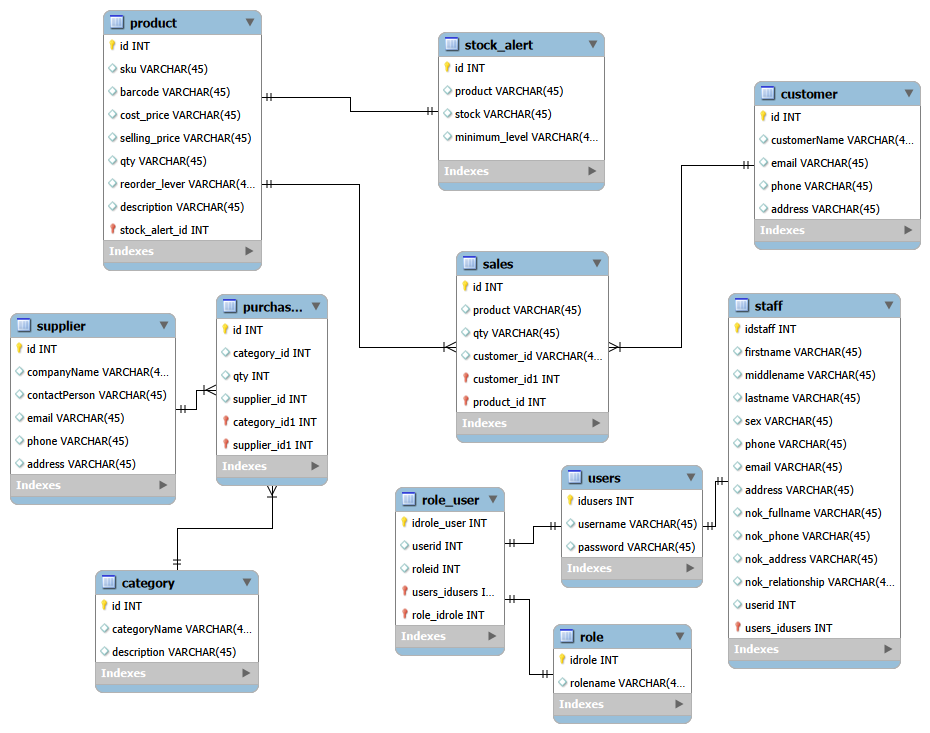
UML Design: A Practical Guide to Modeling Software Systems
When building software, it is often useful to design and understand the system before writing the actual code.
UML Design: A Practical Guide to Modeling Software Systems
When building software, it is often useful to design and understand the system before writing the actual code. Unified Modeling Language (UML) provides a standard way to visually represent the structure and behavior of a software system.
UML diagrams can help developers, architects, business analysts, and other stakeholders communicate ideas clearly before and during development.
What Is UML?
UML (Unified Modeling Language) is a standardized modeling language used to visualize, specify, and document software systems.
Rather than immediately jumping into classes, database tables, and APIs, developers can use UML diagrams to answer questions such as:
Who will use the system?
What can users do?
What objects exist in the system?
How do different components interact?
How does a process flow from one step to another?
UML is not a programming language. Instead, it provides diagrams and notation for describing a system.
Common UML Diagrams
UML contains several types of diagrams, but developers commonly work with a few important ones.
1. Use Case Diagram
A use case diagram describes what users can do with a system.
For example, in an online shopping system, a customer may be able to:
Register an account
Log in
Search for products
Add products to a cart
Place an order
Make a payment
The customer is an actor, while actions such as "Place Order" and "Make Payment" are use cases.
A simple representation could look like:
Customer
   |
   +----> Register
   |
   +----> Login
   |
   +----> Search Products
   |
   +----> Place Order
   |
   +----> Make Payment
Use case diagrams are particularly useful during requirements analysis.
2. Class Diagram
A class diagram describes the structure of a system by showing classes, their properties, methods, and relationships.
For example, an e-commerce application might contain:
Customer
----------------
- id
- name
- email
----------------
+ register()
+ login()

Order
----------------
- id
- orderDate
- status
----------------
+ createOrder()
+ cancelOrder()
A customer may have many orders, creating a relationship between the Customer and Order classes.
Class diagrams are especially useful when designing object-oriented applications such as Java, C#, and other object-oriented systems.
3. Sequence Diagram
A sequence diagram shows how different objects or components communicate over time.
For example, when a customer logs into an application:
Customer -> Login Page: Enter credentials
Login Page -> Auth Service: Authenticate
Auth Service -> Database: Find user
Database -> Auth Service: User found
Auth Service -> Login Page: Authentication successful
Login Page -> Customer: Show dashboard
This makes it easier to understand the order in which operations take place.
Sequence diagrams are particularly useful when designing APIs and backend services.
4. Activity Diagram
An activity diagram represents the flow of a process.
For example, an online payment process might be represented as:
Start
  |
Enter Payment Details
  |
Validate Details
  |
  +---- Invalid ----> Show Error
  |
 Valid
  |
Process Payment
  |
Payment Successful?
  |
 Yes
  |
Send Confirmation
  |
 End
Activity diagrams are useful for business processes, workflows, and application logic.
Why Use UML?
UML can provide several benefits during software development.
Better communication: Developers and non-technical stakeholders can discuss a visual representation of the system.
Early problem detection: Design problems can often be identified before they become expensive implementation problems.
Improved documentation: UML diagrams provide a visual reference for future developers.
Better system design: Developers can think about relationships and responsibilities before writing code.
Easier maintenance: Well-designed diagrams can help developers understand an existing system.
UML and Modern Software Development
UML does not have to mean creating dozens of complicated diagrams before writing code. In modern development, it is often more effective to create only the diagrams that provide real value.
For example, before implementing a Spring Boot application, a developer might create a class diagram to identify entities and relationships, followed by a sequence diagram to understand how a particular API request should flow through the system.
The diagrams can then evolve as the application evolves.
Conclusion
UML provides developers with a practical way to visualize software systems before and during implementation. Use case diagrams help define requirements, class diagrams describe structure, sequence diagrams explain interactions, and activity diagrams represent workflows.
The goal of UML is not to create documentation for its own sake. The goal is to make software design easier to understand, communicate, and implement.
For developers working on larger applications, spending a little time modeling the system can prevent significant problems later in the development process.
Tags:
UML, UML Design, Software Design, Software Architecture, Class Diagram, Use Case Diagram, Sequence Diagram, Activity Diagram, Object-Oriented Programming, Software Development