
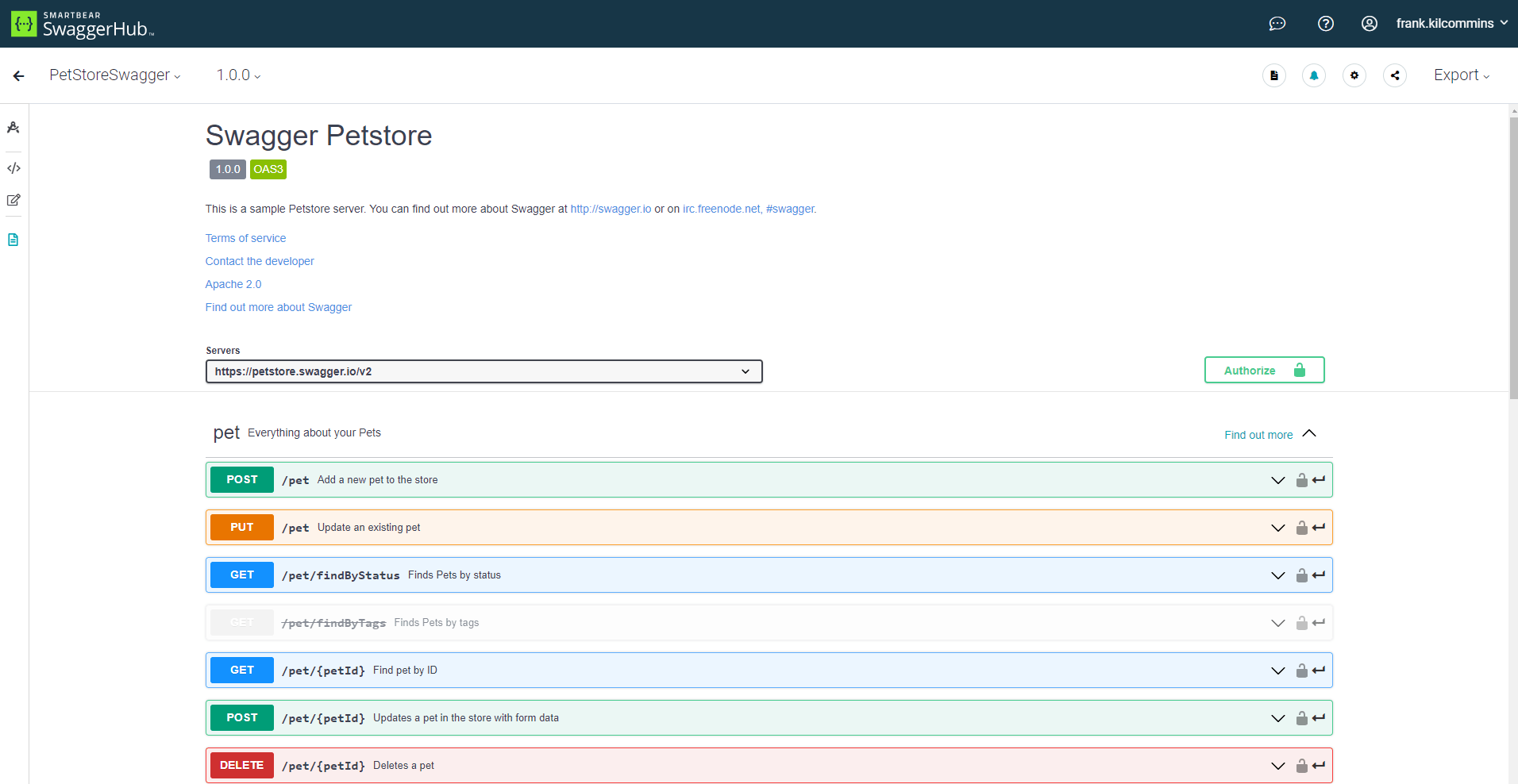
Practical Guide to Configuring Swagger in Spring Boot
When building REST APIs with Spring Boot, documentation is an important part of the development process.
Practical Guide to Configuring Swagger in Spring Boot
When building REST APIs with Spring Boot, documentation is an important part of the development process. Developers need to know which endpoints are available, what parameters they accept, what responses they return, and how to test them.
One of the easiest ways to document and test a Spring Boot REST API is with Swagger, which is commonly used through the OpenAPI specification.
In this practical guide, we will configure Swagger UI in a Spring Boot application and use it to document and test a simple REST API.
What Is Swagger?
Swagger is a set of tools used for designing, documenting, and testing REST APIs.
Modern Spring Boot applications commonly use springdoc-openapi, which generates an OpenAPI specification from your Spring application and provides a web-based Swagger UI.
After configuration, you can access an interface similar to:
http://localhost:8080/swagger-ui/index.html
From the Swagger UI, developers can:
View available API endpoints
See request parameters
View request and response models
Execute API requests
Test authentication
Understand HTTP response codes
Download or inspect the OpenAPI specification
1. Create a Spring Boot Project
For this example, we will create a simple Spring Boot REST API.
The project can contain the following structure:
src
└── main
    └── java
        └── com.example.demo
            ├── DemoApplication.java
            └── controller
                └── UserController.java
The example will expose two endpoints:
GET /api/users
GET /api/users/{id}
2. Add the Swagger Dependency
If you are using Maven, add the Springdoc OpenAPI dependency to your pom.xml.
<dependency>
    <groupId>org.springdoc</groupId>
    <artifactId>springdoc-openapi-starter-webmvc-ui</artifactId>
    <version>2.8.13</version>
</dependency>
The exact Springdoc version should be selected based on the Spring Boot version used by your project.
For a Spring Boot 3 application, the springdoc-openapi-starter-webmvc-ui dependency is the usual choice for Spring MVC applications.
After adding the dependency, reload Maven.
If you are using Gradle:
implementation 'org.springdoc:springdoc-openapi-starter-webmvc-ui:2.8.13'
3. Create a REST Controller
Let's create a simple controller.
package com.example.demo.controller;

import org.springframework.web.bind.annotation.*;

import java.util.List;

@RestController
@RequestMapping("/api/users")
public class UserController {

    @GetMapping
    public List<String> getUsers() {
        return List.of(
                "Julius",
                "John",
                "Mary"
        );
    }

    @GetMapping("/{id}")
    public String getUser(@PathVariable Long id) {
        return "User ID: " + id;
    }
}
Start the Spring Boot application.
If the application is running on port 8080, you should be able to access:
http://localhost:8080/api/users
The response should look something like:
[
    "Julius",
    "John",
    "Mary"
]
At this point, the API works, but we haven't explicitly documented it.
4. Open Swagger UI
With Springdoc installed, Swagger UI is automatically generated.
Open:
http://localhost:8080/swagger-ui/index.html
You should see your UserController and its endpoints.
For example:
User Controller

GET /api/users
GET /api/users/{id}
Clicking an endpoint displays information about the request.
You can also click Try it out and execute the endpoint directly from the browser.
This is one of the biggest advantages of Swagger UI during API development.
5. Check the OpenAPI Specification
Springdoc also exposes the generated OpenAPI specification.
Open:
http://localhost:8080/v3/api-docs
You will receive JSON describing your API.
For example:
{
  "openapi": "3.0.1",
  "info": {
    "title": "Demo API",
    "version": "1.0"
  },
  "paths": {
    "/api/users": {
      "get": {
        "responses": {
          "200": {
            "description": "OK"
          }
        }
      }
    }
  }
}
The OpenAPI document is generated from your Spring Boot application.
6. Configure API Information
The automatically generated Swagger documentation works, but the API information can be improved.
Create a configuration class:
package com.example.demo.config;

import io.swagger.v3.oas.models.OpenAPI;
import io.swagger.v3.oas.models.info.Contact;
import io.swagger.v3.oas.models.info.Info;
import org.springframework.context.annotation.Bean;
import org.springframework.context.annotation.Configuration;

@Configuration
public class OpenApiConfig {

    @Bean
    public OpenAPI customOpenAPI() {

        return new OpenAPI()
                .info(new Info()
                        .title("CodeDigest User API")
                        .version("1.0")
                        .description("REST API for managing users")
                        .contact(new Contact()
                                .name("CodeDigest")
                                .email("info@codedigestmagazine.com")));
    }
}
Now refresh Swagger UI.
You should see:
CodeDigest User API
Version 1.0

REST API for managing users
This is much more useful than leaving the API with generic information.
7. Document Your Controller
Swagger can automatically discover your endpoints, but we can provide additional information using OpenAPI annotations.
For example:
package com.example.demo.controller;

import io.swagger.v3.oas.annotations.Operation;
import io.swagger.v3.oas.annotations.tags.Tag;
import org.springframework.web.bind.annotation.*;

import java.util.List;

@RestController
@RequestMapping("/api/users")
@Tag(
    name = "Users",
    description = "APIs for managing users"
)
public class UserController {

    @Operation(
        summary = "Get all users",
        description = "Returns a list of all users"
    )
    @GetMapping
    public List<String> getUsers() {

        return List.of(
                "Julius",
                "John",
                "Mary"
        );
    }

    @Operation(
        summary = "Get user by ID",
        description = "Returns a user using the supplied ID"
    )
    @GetMapping("/{id}")
    public String getUser(
            @PathVariable Long id) {

        return "User ID: " + id;
    }
}
Now Swagger UI will display:
Users
    GET /api/users
        Get all users

    GET /api/users/{id}
        Get user by ID
The @Tag annotation groups related endpoints.
The @Operation annotation describes individual endpoints.
8. Document Path Parameters
We can also document the id parameter.
import io.swagger.v3.oas.annotations.Parameter;

@Operation(
    summary = "Get user by ID",
    description = "Returns a user using the supplied ID"
)
@GetMapping("/{id}")
public String getUser(
        @Parameter(
            description = "Unique ID of the user",
            example = "1001"
        )
        @PathVariable Long id) {

    return "User ID: " + id;
}
Swagger UI will now show:
id
Unique ID of the user

Example: 1001
This makes the API easier for another developer to understand.
9. Document Request Bodies
Real applications usually receive JSON request bodies.
Let's create a simple request class:
package com.example.demo.dto;

public class CreateUserRequest {

    private String name;
    private String email;

    public String getName() {
        return name;
    }

    public void setName(String name) {
        this.name = name;
    }

    public String getEmail() {
        return email;
    }

    public void setEmail(String email) {
        this.email = email;
    }
}
Now add a POST endpoint:
@PostMapping
public String createUser(
        @RequestBody CreateUserRequest request) {

    return "User created: " + request.getName();
}
Swagger automatically detects the request body.
The Swagger UI will provide a request such as:
{
    "name": "Julius",
    "email": "julius@example.com"
}
You can click Try it out and submit the request directly.
10. Improve Request Documentation
You can make the request documentation even better using @Schema.
package com.example.demo.dto;

import io.swagger.v3.oas.annotations.media.Schema;

public class CreateUserRequest {

    @Schema(
        description = "Full name of the user",
        example = "Julius Fasema"
    )
    private String name;

    @Schema(
        description = "Email address of the user",
        example = "julius@example.com"
    )
    private String email;

    // getters and setters
}
Swagger UI will now show useful descriptions and examples for the request fields.
11. Document Responses
A production API should also clearly document its possible responses.
For example:
import io.swagger.v3.oas.annotations.responses.ApiResponse;
import io.swagger.v3.oas.annotations.responses.ApiResponses;

@Operation(
    summary = "Get user by ID"
)
@ApiResponses({
    @ApiResponse(
        responseCode = "200",
        description = "User found successfully"
    ),
    @ApiResponse(
        responseCode = "404",
        description = "User not found"
    )
})
@GetMapping("/{id}")
public String getUser(
        @PathVariable Long id) {

    return "User ID: " + id;
}
Swagger will display:
200 - User found successfully

404 - User not found
This is particularly useful when an API has many possible response codes.
12. Configure Swagger Behind a Context Path
Sometimes your application runs under a context path.
For example:
server.servlet.context-path=/api
Your application endpoint may then become:
/api/users
Swagger UI may be accessed through:
/api/swagger-ui/index.html
and the OpenAPI specification through:
/api/v3/api-docs
When deploying behind Nginx or another reverse proxy, make sure the proxy configuration correctly forwards the Swagger and OpenAPI paths.
13. Change the Swagger UI URL
You can customize the Swagger UI path.
In application.properties:
springdoc.swagger-ui.path=/swagger
Swagger UI can then be accessed through:
http://localhost:8080/swagger
Instead of:
http://localhost:8080/swagger-ui/index.html
This is optional, but it can provide a cleaner URL.
14. Disable Swagger in Production
Swagger is extremely useful during development, but you may not want the documentation publicly available in every environment.
One approach is to use Spring profiles.
For example:
# application-dev.properties

springdoc.api-docs.enabled=true
springdoc.swagger-ui.enabled=true
Then:
# application-prod.properties

springdoc.api-docs.enabled=false
springdoc.swagger-ui.enabled=false
Your development environment will have:
Swagger UI
    ↓
Enabled
while production has:
Swagger UI
    ↓
Disabled
Whether you disable it completely in production depends on your API strategy. Some organizations intentionally expose public API documentation, while private APIs should generally be protected.
15. Adding JWT Authentication to Swagger
If your Spring Boot API uses JWT authentication, Swagger can also provide an Authorize button.
Add a security scheme to your OpenAPI configuration:
package com.example.demo.config;

import io.swagger.v3.oas.models.OpenAPI;
import io.swagger.v3.oas.models.Components;
import io.swagger.v3.oas.models.info.Info;
import io.swagger.v3.oas.models.security.SecurityScheme;
import org.springframework.context.annotation.Bean;
import org.springframework.context.annotation.Configuration;

@Configuration
public class OpenApiConfig {

    @Bean
    public OpenAPI customOpenAPI() {

        return new OpenAPI()
                .info(new Info()
                        .title("CodeDigest API")
                        .version("1.0")
                        .description("REST API documentation"))
                .components(
                        new Components()
                                .addSecuritySchemes(
                                        "bearerAuth",
                                        new SecurityScheme()
                                                .type(SecurityScheme.Type.HTTP)
                                                .scheme("bearer")
                                                .bearerFormat("JWT")
                                )
                );
    }
}
Then use:
import io.swagger.v3.oas.annotations.security.SecurityRequirement;

@SecurityRequirement(name = "bearerAuth")
For example:
@RestController
@RequestMapping("/api/users")
@SecurityRequirement(name = "bearerAuth")
public class UserController {

    // endpoints
}
Swagger UI will display an Authorize button.
You can enter:
Bearer YOUR_JWT_TOKEN
and Swagger will include the token when making protected requests.
16. A Practical Project Structure
A typical Spring Boot project using Swagger could look like this:
src/main/java/com/example/demo

├── config
│   └── OpenApiConfig.java
│
├── controller
│   └── UserController.java
│
├── dto
│   └── CreateUserRequest.java
│
├── service
│   └── UserService.java
│
├── repository
│   └── UserRepository.java
│
└── DemoApplication.java
Swagger configuration belongs in the config package.
This keeps API documentation configuration separate from your controllers and business logic.
17. Common Swagger URLs
After configuring Springdoc, these are the URLs you will commonly use:
| Purpose | URL |
|---|---|
| Swagger UI | /swagger-ui/index.html |
| OpenAPI JSON | /v3/api-docs |
| OpenAPI YAML | /v3/api-docs.yaml |
For a local application running on port 8080:
http://localhost:8080/swagger-ui/index.html
http://localhost:8080/v3/api-docs
18. Common Problems
Swagger UI returns 404
Check that the Springdoc dependency is present.
For Maven:
<dependency>
    <groupId>org.springdoc</groupId>
    <artifactId>springdoc-openapi-starter-webmvc-ui</artifactId>
    <version>2.8.13</version>
</dependency>
Also make sure the application has started successfully.
Try:
http://localhost:8080/v3/api-docs
If /v3/api-docs also returns 404, Springdoc may not be loaded correctly.
Swagger Doesn't Show My Controller
Check that the controller is inside the package scanned by Spring Boot.
For example:
com.example.demo
    ├── DemoApplication
    └── controller
        └── UserController
If your controller is outside the application's component scan, Spring may not discover it.
Swagger Works Locally but Not Behind Nginx
If your application is deployed behind Nginx, check the proxy configuration.
For example, if Nginx forwards:
/api/
to your Spring Boot application, make sure requests to:
/swagger-ui/
and:
/v3/api-docs
are also routed correctly.
19. Recommended Approach
For a real Spring Boot project, you don't need to put Swagger annotations everywhere.
Start with the automatic documentation:
springdoc-openapi
Then add annotations where they provide useful information:
@Tag
@Operation
@ApiResponse
@Parameter
@Schema
@SecurityRequirement
A good API should communicate:
What does this endpoint do?
        ↓
What does it accept?
        ↓
What does it return?
        ↓
What errors can occur?
        ↓
Does it require authentication?
Swagger/OpenAPI provides a convenient way to communicate all of this.
Conclusion
Configuring Swagger in Spring Boot is relatively simple with Springdoc OpenAPI.
The basic setup requires only the Springdoc dependency:
<dependency>
    <groupId>org.springdoc</groupId>
    <artifactId>springdoc-openapi-starter-webmvc-ui</artifactId>
    <version>2.8.13</version>
</dependency>
Once the application starts, Swagger UI is available at:
http://localhost:8080/swagger-ui/index.html
From there, you can document your controllers, request parameters, request bodies, responses, and authentication requirements.
For small projects, the automatic documentation may be enough. For production APIs, however, adding meaningful descriptions, examples, response codes, authentication information, and proper API metadata makes the documentation significantly more useful.
Swagger should not be treated as an afterthought. Good API documentation is part of good API design, and integrating it directly into your Spring Boot application means the documentation can evolve alongside the code.
Tags: Spring Boot, Swagger, OpenAPI, Springdoc OpenAPI, REST API, API Documentation, Swagger UI, Java, Spring Framework, Backend Development, REST API Testing