
Machine Learning Model for Hate Speech Detection: Practical Approach
Learn how to use Python and machine learning to classify tweets into hate speech, offensive speech, and non-offensive content using a Decision Tree classifier.
What Is This All About?
Machine
learning models are robust and intelligent to understand data even without
explicitly been trained.
Here,
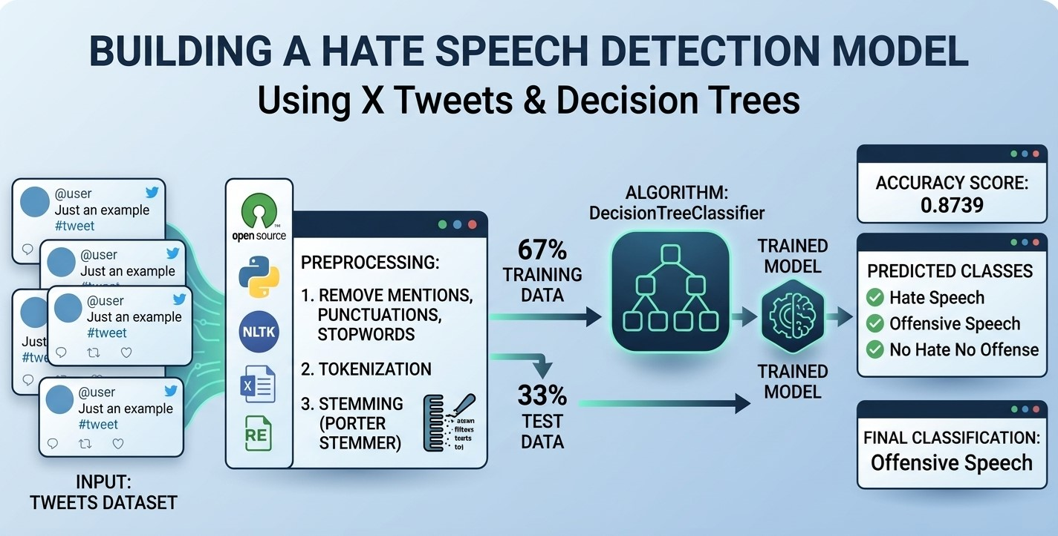
we see how a DecisionTreeClassifier Model is been fed with a dataset of
tweets from X (formerly Twitter), and it could classify text as either “Hate Speech”, “Offensive Speech”, and
“No
Hate No Offense”
This three categories can be seen as
the model’s decision, or better still called the Target Variables
How Was It Built?
As
earlier noted, it was built by feeding a dataset containing tweets from X into
a DecisionTreeClassifier Algorithm which trains the model. Of course, the
necessary preprocessing stages like; removal of mentions, punctuations and
stopwords were done, tokenization and stemming (PorterStemmer from nltk.stem)
were equally done before splitting of the dataset into 20% test and 80%
training data.
Demystifying the Magic
Importing all necessary libraries;
import pandas as pd
import numpy as np
import nltk
from sklearn.feature_extraction.text import CountVectorizer
from sklearn.model_selection import train_test_split
from sklearn.tree import DecisionTreeClassifier
from sklearn.metrics import accuracy_score
The Natural Language Tool Kit (nltk) and
the Regex Expression libraries (re) for preprocessing of data
import nltk
nltk.download('stopwords')
import re
from nltk.corpus import stopwords
stopword = set(stopwords.words('english'))
stemmer = nltk.SnowballStemmer('english')
The dataset is a CSV (comma separated value file) extracted from
the open_tweet github repository, and then loaded for cleaning.
data_df = pd.read_csv('train.csv')
print(data_df.head())

Exploring the dataset and preprocessing the data;
data_df['labels'] = data_df['class'].map({0:'Hate
Speech', 1:'Offensive Speech',2:'No
Hate No Offense'})
data_df = data_df[['tweet','labels']]
data_df.describe()

The .describe method on the data frame gives you a typical
understanding of the data format.
data_df['labels'].unique()
User the Seaborn library to visualize the data.
import seaborn as sns
sns.set_theme()
sns.countplot(data_df, x ='labels')

Now, the actual tweets can be compared against their actual labels.
data_df.head()
data_df.tail()
Here is where the heart of the preprocessing stage comes in!
Removing stopwords, stemming the data, converting text to lowercase. Any
language other than English can be used for stopword filtering.
def
clean_tweet(text):
text = text.lower() #
Convert to lowercase
text = re.sub(r"[^\w\s]",
"", text) # Remove punctuation
#text = re.sub(r"[^A-Za-z0-9]+", "", text)
# Load stopwords (replace 'english' with your desired language)
stop_words
= set(stopwords.words('english'))
# Filter out stopwords (assuming text is tokenized)
text = [word for word in text.split() if word not in stop_words]
# Import and use a stemmer (replace PorterStemmer with your
preferred stemmer)
from nltk.stem import PorterStemmer
stemmer
= PorterStemmer()
text = [stemmer.stem(word) for word in text]
return
' '.join(text)
data_df['tweet'] = data_df['tweet'].apply(clean_tweet)
print(data_df.head())

Now, the tweets and labels can be stored in an array and tokenize.
Tokenize here simply converts the tweets into
a matrix of token counts.
x = np.array(data_df['tweet'])
y = np.array(data_df['labels'])
cv = CountVectorizer()
Fit it to the text data;
x = cv.fit_transform(x)
At this stage, the dataset
can be splitted and the algorithm initialized
X_train, X_test, y_train, y_test = train_test_split(x, y, test_size=0.2, random_state=24)
model = DecisionTreeClassifier()
Here is where training the algorithm comes in, by simply fitting
the data to the model.
model.fit(X_train, y_train)
And just like that, a DecisionTreeClassifier model has been
trained!!
Now, the trained model can be tested to make predictions against
the actual data preserved for testing and then check how well it performed (Accuracy)
y_pred = model.predict(X_test)
print(accuracy_score(y_test, y_pred))
0.871494855759532 in this
case was the accuracy score of the model.
This
score can be improved to as far as 99%.
Now,
models mostly perform well on the data they’re trained with. However, they may
sometimes perform poorly on external data. Data that has completely different
patterns from the initial data used to train them.
So,
using data that has a completely different pattern and hidden from them, to
test their accuracy strength.
i = 'You
seem to be a nice person'
i = cv.transform([i]).toarray()
print(model.predict((i)))
Output:
['No Hate No Offense']
Conclusion
By leveraging standard natural language processing
techniques and a simple Decision Tree Classifier, one can successfully develop
an effective machine learning model to categorize social media text. With an
accuracy rate of over 87%, this pipeline demonstrates that powerful content
moderation tools can be built efficiently using common Python libraries.
Tags: Python, NLTK, ML, X, Data, Dataset, CSV, Jupyter Notebook, Hate Speech Detection