
JWT Authentication in Spring Boot: A Practical Guide
When building a REST API, protecting endpoints so that only authenticated users can access them is an important part of application security.
One common approach is JSON Web Token (JWT) authentication.
Recently, JWT authentication was added to a Spring Boot application to protect REST API endpoints. The implementation uses two main components:
JwtService— generates and validates JWT tokens.JwtAuthenticationFilter— reads the JWT from incoming requests and authenticates the user.
This article walks through the implementation and explains how the different pieces work together.
What Is JWT?
JWT stands for JSON Web Token.
A JWT is a compact token that can be sent between a client and a server to represent an authenticated user.
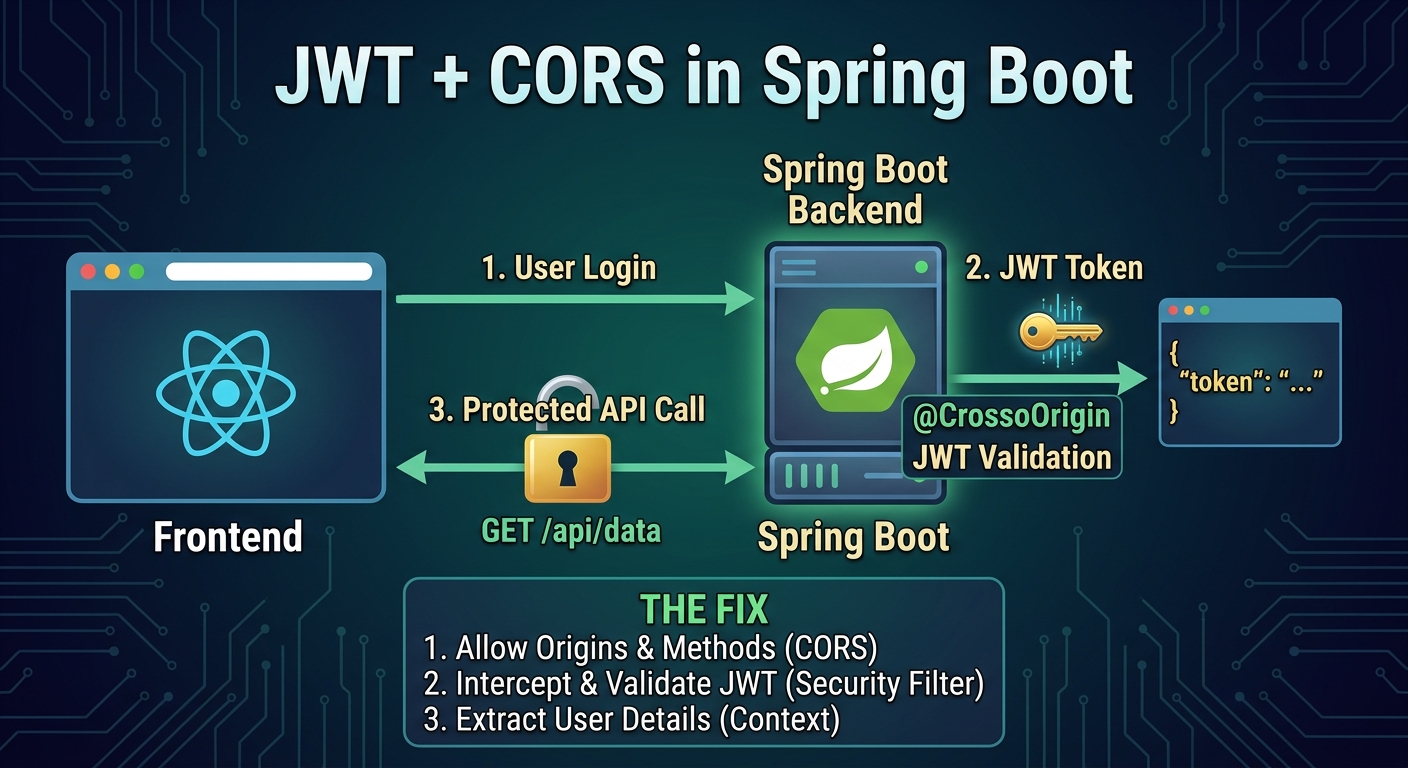
A typical authentication flow looks like this:
User enters username and password
              ↓
        Login request
              ↓
       Spring Boot API
              ↓
      Authenticate user
              ↓
       Generate JWT
              ↓
       Return JWT token
              ↓
        Frontend stores token
              ↓
   Frontend sends JWT with requests
              ↓
     JWT Authentication Filter
              ↓
        Validate JWT
              ↓
     Authenticate the user
              ↓
       Protected endpoint
Instead of sending the username and password with every request, the client sends the JWT:
Authorization: Bearer <JWT_TOKEN>
Adding the JWT Dependency
Before creating the JWT service, add the JJWT (Java JWT) dependency to the Spring Boot project's pom.xml.
Add the following dependency:
<!-- JWT -->
<dependency>
    <groupId>io.jsonwebtoken</groupId>
    <artifactId>jjwt-api</artifactId>
    <version>0.12.6</version>
</dependency>
The dependency provides the JWT API used by the application, including classes such as:
import io.jsonwebtoken.Jwts;
import io.jsonwebtoken.io.Decoders;
import io.jsonwebtoken.security.Keys;
After adding the dependency, reload the Maven project so that the dependency is downloaded.
You can also rebuild the project using:
mvn clean install
The implementation in this article uses JJWT version 0.12.6.
Note: In a production project, make sure the JJWT dependencies required by your chosen version and build configuration are available on the runtime classpath. The code shown in this article uses the JJWT API dependency specified above.
Step 1: Configure the JWT Secret and Expiration
The first step is to configure the JWT secret and token expiration in application.properties.
# ================================
# JWT CONFIG - expires in 1hr
#=================================
jwt.secret=VGhpc0lzQVN1cGVyTG9uZ1NlY3JldEcZhc3RtYXJ0MjAyNg==
jwt.expiration=3600000
The application reads these values using Spring's @Value annotation:
@Value("${jwt.secret}")
private String secret;

@Value("${jwt.expiration}")
private long expiration;
The expiration value is specified in milliseconds.
3600000 milliseconds = 1 hour
Therefore, a token generated by this application expires after one hour.
About the JWT Secret
The secret is used to sign and verify the JWT.
In this implementation, the secret is Base64 encoded and decoded before being converted into a cryptographic signing key.
For a real production application, the JWT secret should not be committed directly to source control. It should be supplied through secure environment configuration or a secrets-management system.
Step 2: Create the JwtService
The JwtService contains the main JWT operations.
Its responsibilities are to:
Create the signing key.
Generate tokens.
Extract the username from a token.
Check whether a token is valid.
Check whether a token has expired.
The service is declared as a Spring service:
@Service
public class JwtService {
This allows Spring to create and inject the class where it is needed.
Step 3: Create the Signing Key
The application uses the following method:
private SecretKey getSigningKey() {
    return Keys.hmacShaKeyFor(
            Decoders.BASE64.decode(secret)
    );
}
The process is:
JWT Secret
    ↓
Base64 Decode
    ↓
Cryptographic Key
    ↓
Sign / Verify JWT
The secret is decoded using:
Decoders.BASE64.decode(secret)
The resulting bytes are then converted into an HMAC signing key:
Keys.hmacShaKeyFor(...)
The same signing key is later used to verify tokens.
Step 4: Generate the JWT Token
The generateToken() method creates the JWT:
public String generateToken(UserDetails userDetails) {

    return Jwts.builder()
            .subject(userDetails.getUsername())
            .issuedAt(new Date())
            .expiration(
                    new Date(System.currentTimeMillis() + expiration)
            )
            .signWith(getSigningKey())
            .compact();
}
The method receives Spring Security's:
UserDetails
The username is stored as the JWT subject:
.subject(userDetails.getUsername())
The token also contains an issued-at timestamp:
.issuedAt(new Date())
The expiration time is calculated using:
System.currentTimeMillis() + expiration
Since expiration is configured as:
3600000
the token expires one hour after it is generated.
Finally, the token is signed:
.signWith(getSigningKey())
and converted into its compact string representation:
.compact();
The result is the JWT that can be returned to the frontend after successful login.
Step 5: Extract the Username from the Token
After the frontend sends the JWT back to the server, the application needs to determine which user the token belongs to.
The extractUsername() method handles this:
public String extractUsername(String token) {

    return Jwts.parser()
            .verifyWith(getSigningKey())
            .build()
            .parseSignedClaims(token)
            .getPayload()
            .getSubject();
}
The token is parsed and verified using:
.verifyWith(getSigningKey())
The application then gets the JWT payload:
.getPayload()
and extracts the subject:
.getSubject();
Because the username was originally stored as the subject, this returns the username associated with the token.
The process is therefore:
JWT
 ↓
Verify signature
 ↓
Read payload
 ↓
Read subject
 ↓
Username
Step 6: Validate the Token
Extracting the username alone is not enough.
The application also needs to verify that the token belongs to the expected user and has not expired.
The isTokenValid() method does this:
public boolean isTokenValid(
        String token,
        UserDetails userDetails
) {

    String username = extractUsername(token);

    return username.equals(userDetails.getUsername())
            && !isTokenExpired(token);
}
Two conditions must be satisfied.
Username must match
username.equals(userDetails.getUsername())
The username contained in the JWT must match the username loaded from the application's user details service.
Token must not be expired
!isTokenExpired(token)
The token must still be valid according to its expiration date.
The final result is therefore:
Username matches
       AND
Token has not expired
       ↓
     Valid
Step 7: Check Token Expiration
The application checks the expiration date using:
private boolean isTokenExpired(String token) {

    return Jwts.parser()
            .verifyWith(getSigningKey())
            .build()
            .parseSignedClaims(token)
            .getPayload()
            .getExpiration()
            .before(new Date());
}
The expiration value is extracted from the JWT:
.getExpiration()
and compared with the current date:
.before(new Date())
If the expiration date is before the current time, the token has expired.
Step 8: Create the JWT Authentication Filter
Generating a JWT is only one part of authentication.
The application also needs to inspect incoming requests and determine whether they contain a valid JWT.
This is the responsibility of:
JwtAuthenticationFilter
The class extends:
OncePerRequestFilter
This allows the filter to execute once for each HTTP request.
The class receives two dependencies:
private final JwtService jwtService;
private final CustomUserDetailsService customUserDetailsService;
JwtService handles JWT operations, while CustomUserDetailsService loads the user.
Step 9: Read the Authorization Header
The filter first reads the Authorization header:
final String authHeader =
        request.getHeader("Authorization");
A request containing a JWT normally looks like:
Authorization: Bearer eyJhbGciOiJIUzI1NiJ9...
The filter checks whether the header exists and begins with:
Bearer
if (authHeader == null ||
        !authHeader.startsWith("Bearer ")) {

    filterChain.doFilter(request, response);
    return;
}
If there is no JWT, the filter simply continues the request.
This is important because not every request necessarily contains authentication information.
Step 10: Extract the JWT
Once the Bearer prefix has been confirmed, the token is extracted:
String jwt = authHeader.substring(7);
The first seven characters are:
Bearer
After removing them, the remaining value is the JWT.
For example:
Bearer abc123
becomes:
abc123
Step 11: Extract the Username
The filter then uses JwtService:
username = jwtService.extractUsername(jwt);
This extracts the username stored in the token.
The operation is wrapped in a try-catch:
try {
    username = jwtService.extractUsername(jwt);
} catch (Exception e) {
    filterChain.doFilter(request, response);
    return;
}
If the token cannot be parsed or verified, the request continues through the filter chain without setting an authenticated user.
Step 12: Load the User
If a username was successfully extracted, the filter loads the user's details:
UserDetails userDetails =
        customUserDetailsService.loadUserByUsername(username);
This allows the application to obtain the user information and authorities associated with that username.
The filter also checks whether authentication has already been established:
SecurityContextHolder.getContext()
        .getAuthentication() == null
Step 13: Validate the Token
The token is then validated:
if (jwtService.isTokenValid(jwt, userDetails)) {
If the token is valid, the application creates a Spring Security authentication object:
UsernamePasswordAuthenticationToken authentication =
        new UsernamePasswordAuthenticationToken(
                userDetails,
                null,
                userDetails.getAuthorities()
        );
The user's authorities are included:
userDetails.getAuthorities()
This allows Spring Security to know what permissions or roles the authenticated user has.
Step 14: Store Authentication in the Security Context
The authentication details are added to the request:
authentication.setDetails(
        new WebAuthenticationDetailsSource()
                .buildDetails(request)
);
The authentication is then stored in Spring Security's context:
SecurityContextHolder
        .getContext()
        .setAuthentication(authentication);
This is an important step.
Once authentication has been placed in the SecurityContextHolder, Spring Security can treat the request as authenticated.
Complete JWT Authentication Filter
The complete filter is:@RequiredArgsConstructorpublic class JwtAuthenticationFilter extends OncePerRequestFilter {private final JwtService jwtService;private final CustomUserDetailsService customUserDetailsService;@Overrideprotected void doFilterInternal(HttpServletRequest request,HttpServletResponse response,FilterChain filterChain) throws ServletException, IOException {final String authHeader =request.getHeader("Authorization");if (authHeader == null ||!authHeader.startsWith("Bearer ")) {filterChain.doFilter(request, response);return;}String jwt = authHeader.substring(7);String username;try {username = jwtService.extractUsername(jwt);} catch (Exception e) {filterChain.doFilter(request, response);return;}if (username != null &&SecurityContextHolder.getContext().getAuthentication() == null) {UserDetails userDetails =customUserDetailsService.loadUserByUsername(username);if (jwtService.isTokenValid(jwt, userDetails)) {UsernamePasswordAuthenticationToken authentication =new UsernamePasswordAuthenticationToken(userDetails,null,userDetails.getAuthorities());authentication.setDetails(new WebAuthenticationDetailsSource().buildDetails(request));SecurityContextHolder.getContext().setAuthentication(authentication);}}filterChain.doFilter(request, response);}}
@Component
How the Complete Authentication Flow Works
Putting everything together, the application works as follows:
                    LOGIN
                      │
                      ↓
             Username + Password
                      │
                      ↓
              Authenticate User
                      │
                      ↓
             JwtService generates
                  JWT Token
                      │
                      ↓
               Return JWT
                      │
                      ↓
             Frontend stores JWT
                      │
                      ↓
          ┌───────────────────────┐
          │ Subsequent API Request│
          └───────────────────────┘
                      │
                      ↓
        Authorization: Bearer JWT
                      │
                      ↓
        JwtAuthenticationFilter
                      │
                      ↓
             Extract JWT
                      │
                      ↓
           Extract Username
                      │
                      ↓
        Load UserDetails from DB
                      │
                      ↓
            Validate JWT
                      │
                ┌─────┴─────┐
                │           │
              Valid        Invalid
                │           │
                ↓           ↓
      Set Authentication   Continue
       in SecurityContext
                │
                ↓
          Protected API
                │
                ↓
             Response
Complete JwtService
For reference, the complete service used in this implementation is:
package com.inventory.fastmart.jwt;import io.jsonwebtoken.Jwts;import io.jsonwebtoken.io.Decoders;import io.jsonwebtoken.security.Keys;import org.springframework.beans.factory.annotation.Value;import org.springframework.stereotype.Service;import org.springframework.security.core.userdetails.UserDetails;import javax.crypto.SecretKey;import java.util.Date;@Servicepublic class JwtService {@Value("${jwt.secret}")private String secret;@Value("${jwt.expiration}")private long expiration;// decode the jwt secret keyprivate SecretKey getSigningKey() {return Keys.hmacShaKeyFor(Decoders.BASE64.decode(secret));}// generates the jwt token - bearer tokenpublic String generateToken(UserDetails userDetails) {return Jwts.builder().subject(userDetails.getUsername()).issuedAt(new Date()).expiration(new Date(System.currentTimeMillis() + expiration)).signWith(getSigningKey()).compact();}// extracts the name of the login userpublic String extractUsername(String token) {return Jwts.parser().verifyWith(getSigningKey()).build().parseSignedClaims(token).getPayload().getSubject();}// checks and validate token - if its a valid tokenpublic boolean isTokenValid(String token,UserDetails userDetails) {String username = extractUsername(token);return username.equals(userDetails.getUsername())&& !isTokenExpired(token);}// checks and validates expiry token - if it has not expiredprivate boolean isTokenExpired(String token) {return Jwts.parser().verifyWith(getSigningKey()).build().parseSignedClaims(token).getPayload().getExpiration().before(new Date());}}
JWT and Spring Security
JWT authentication works together with Spring Security rather than replacing it.
The JWT filter identifies and authenticates the user, while Spring Security uses that authentication information when deciding whether the user can access an endpoint.
For example, protected endpoints can be configured with:
.requestMatchers("/api/v1/**")
.authenticated()
The overall process becomes:
HTTP Request
     ↓
JWT Authentication Filter
     ↓
Extract JWT
     ↓
Validate JWT
     ↓
Load UserDetails
     ↓
Set SecurityContext
     ↓
Spring Security
     ↓
Check Authorization
     ↓
Controller
JWT Is Stateless Authentication
One of the important characteristics of this implementation is that the application uses stateless authentication.
The JWT contains information that allows the server to identify the authenticated user without maintaining a traditional server-side login session.
This works particularly well with REST APIs.
In a Spring Security configuration, this can be combined with:
.sessionManagement(session ->
        session.sessionCreationPolicy(
                SessionCreationPolicy.STATELESS
        )
)
The server does not maintain a traditional HTTP session for the authenticated API user.
Instead, each request carries its authentication information through the JWT.
JWT and Frontend Applications
A frontend application such as Vue can store the JWT after login and send it with subsequent API requests.
For example:
POST /api/v1/auth/login
After successful authentication, the backend returns a token.
The frontend can then send:
Authorization: Bearer <token>
with requests to protected endpoints.
This creates the connection between the frontend and the Spring Boot security layer:
Vue / React / Angular
          │
          │ Bearer JWT
          ↓
     Spring Boot API
          │
          ↓
JwtAuthenticationFilter
          │
          ↓
    JwtService
          │
          ↓
Spring Security Context
          │
          ↓
    Protected API
Testing the JWT Authentication
Once JWT authentication has been configured, the easiest way to test it is to follow the complete authentication flow.
1. Login
Send the user's credentials to the login endpoint:
POST /api/v1/auth/login
The server authenticates the user and returns a JWT.
2. Copy the Token
The returned response should contain the JWT token.
For example:
{
    "token": "eyJhbGciOiJIUzI1NiJ9..."
}
3. Call a Protected Endpoint
Send the JWT in the Authorization header:
Authorization: Bearer eyJhbGciOiJIUzI1NiJ9...
For example:
GET /api/v1/find-all-categories
4. Observe the Result
If the token is valid and the user is authenticated, Spring Security allows the request to reach the protected endpoint.
If the token is missing, invalid, or expired, the request will not be treated as authenticated.
This gives a simple way to verify that the JWT filter and Spring Security configuration are working together.
Common JWT Problems
When implementing JWT authentication, several problems can occur.
Invalid or Missing Token
If the frontend does not send:
Authorization: Bearer <token>
the JWT filter cannot authenticate the request.
Expired Token
The application configured the token to expire after one hour:
jwt.expiration=3600000
After expiration, the token must no longer be considered valid.
Incorrect Secret
The same secret must be used when signing and verifying the token.
If the secret changes unexpectedly, previously generated tokens may fail verification.
CORS Errors
When a browser-based frontend calls the Spring Boot API from another origin, CORS must also be configured correctly.
This is particularly important when the frontend sends an Authorization header containing the JWT.
For example:
Frontend
http://localhost:5173

        ↓

Spring Boot API
http://localhost:8083
Because these are different origins, the browser applies CORS rules.
Conclusion
Adding JWT authentication to a Spring Boot REST API involves several connected components.
The application needs to:
Add the JJWT dependency.
Configure a JWT secret.
Configure the token expiration period.
Create a signing key.
Generate JWT tokens after successful authentication.
Extract information from incoming tokens.
Validate the token signature and expiration.
Load the corresponding user.
Create a Spring Security authentication object.
Store the authentication in the security context.
Protect API endpoints with Spring Security.
Send the JWT as a Bearer token from the frontend.
The combination of JwtService and JwtAuthenticationFilter provides the core JWT mechanism used in this application.
Once this is working, a frontend can authenticate through the login endpoint and use the returned JWT as a Bearer token when accessing protected REST API endpoints.
JWT authentication therefore provides a practical way to secure stateless Spring Boot APIs while allowing frontend applications to authenticate and access protected resources.
Tags: Spring Boot, JWT, JSON Web Token, Spring Security, Java, REST API, Authentication, Authorization, JWT Authentication, Bearer Token, SecurityFilterChain, OncePerRequestFilter, UserDetails, API Security, JJWT, Backend Development